Proposals vs One-Pagers vs Case Studies: How to Design a Reusable Content Stack in Qwilr
Where are your sales reps spending the most time?
(Hint: If you thought they were busy closing, you are wrong.)
McKinsey reports that two-thirds of a sales team’s time is spent on non-selling activity, and a big chunk of it is spent on making the sale happen, in other words, hunting for the right case study to prove credibility. Rebuilding one-pagers to frame value for a new vertical. Formatting proposals to look professional.
It’s safe to say that sales content chaos plays a starring role in reducing productivity for sales teams.
It’s not that sales content doesn’t exist. It's just everywhere and nowhere all at once. Tucked into old Google Docs, buried in Notion, scattered across desktop folders with naming conventions only one person ever understood—and they left months ago. So every asset feels like a fresh build, even when it shouldn't be.
What if there was a better way to create sales content (one where assets aren’t rebuilt from scratch every time, but treated like building blocks) that are modular, reusable, and ready to drop into any doc in seconds?
In this article, we’ll show you how leading sales and RevOps teams are doing just that: designing a reusable content stack inside Qwilr that powers proposals, one-pagers, and case studies without the copy-paste chaos.
One-pagers, case studies, and proposals: What role does each play in your sales motion?
Before we dive into reusable content stacks, let’s look at the parts. Proposals, one-pagers, and case studies each serve a different purpose, so let’s break down what they’re for, where they fit in your sales cycle, and how to use that shared structure to your advantage.
One-pagers: the fastest way to frame your value
Sales one-pagers are often the first asset a prospect sees after a demo or discovery call. They’re built for speed and designed to communicate your core value, make your solution easy to share internally, and move the conversation forward without overwhelming detail.
There are several types of sales one-pagers: company overviews, feature spotlights, vertical-specific use cases, proof summaries, and even ROI breakdowns. Most include a blend of problem-solution framing, benefits, social proof, visuals, and a clear CTA.
But here’s the nuance. “Nobody wants your one-pager”, says Amanda Natividad, VP Marketing at SparkToro.
As Amanda points out in the post above, prospects might say they want a one-pager, but what they really want is the fastest path to a decision. Something scannable, shareable, and self-explanatory.
Not to forget that interactive one-pagers shine where reps can drop in pre-approved blocks—like a video embed, a mini case study, or a pricing summary—and assemble a tailored, on-brand asset in minutes shine better than static PDFs.
Case studies: proof that helps you close
Once a prospect is seriously considering you, they want more proof, not just promises.
That’s why, in the later stages of the deal—when objections surface, procurement gets involved, or you're trying to win over an executive—case studies become your most persuasive asset. They show that companies like theirs have solved problems like theirs, and that your product delivered real results.
But are they necessary? HubSpot reports that companies that regularly publish strong case studies generate 45% more qualified leads than those that don’t.
That’s why sales-oriented teams use them as targeted assets: embedded in one-pagers, linked in follow-ups, or included in live proposals. They show that companies like theirs have solved problems like theirs, and that your product delivered real results.
A strong case study should include:
- A relatable customer (same industry, size, or challenge)
- A simple story: the problem, what changed, and what improved
- Specific outcomes (with numbers or quotes that feel human)
- A format that’s easy to scan or forward internally
If you want to write a case study that actually gets read and helps close, our Head of Growth has broken down the ways to write case studies that win deals.
Again, when compared with static case studies, interactive case studies are faster to tailor, easier to track, and more compelling than another PDF in someone’s inbox + much faster to produce with content blocks (which we’ll explore later in the article).
Proposals: the final push that should feel effortless
A well-crafted proposal not only recaps what was discussed but also helps decision-makers say yes with clarity, confidence, and no extra friction.
By the time you’re sending a proposal, the stakes are higher. Your champion is likely sharing it internally, forwarding it to finance, or using it to justify the budget. At this point, the deal doesn’t fall apart because of product-market fit—it stalls because of confusion, misalignment, or process delays.
That’s why proposals still matter. They bring structure to the decision. They remind buyers of the problem you’re solving, the outcomes they can expect, and the path forward. They help everyone (especially those who weren’t in the demo) get up to speed quickly.
A strong proposal should:
- Reinforce value without repeating your website
- Include relevant proof, pricing, and termswithout overwhelming detail
- Be easy to share, scan, and act on
- Leave zero ambiguity on next steps
The format matters, too. Interactive proposals (like the ones from Qwilr) give your champion a smoother experience than static docs buried in email threads. They’re easier to personalize, faster to build, quicker to read, and help keep momentum when you're closest to the finish line.
What exactly is a reusable content stack?
If you’ve read this far, you already know proposals, case studies, and one-pagers each play a unique role. But even though teams are creating more content than ever, they don’t need to—most of it is made from the same building blocks, just reshaped for different moments.
That’s what makes reusable content so powerful, as they are built to:
- plug into different deal stages (so reps send the right message at the right time)
- stay up-to-date and on-brand (so marketing doesn’t have to play content police)
- flex with the buyer journey (so assets feel relevant—not generic or bloated)
Let’s look at the table below: same blocks, different formats of these sales assets:
| Content Block | Purpose | Proposal | One-Pager | Case Study |
|---|---|---|---|---|
Problem–Solution | Frame the core challenge and how you solve it | Yes | Yes | Yes |
Value Proposition | Summarize your unique benefit | Yes | Yes | Yes |
Proof Points | Back claims with evidence | Yes | Yes | Yes |
Customer Quotes / Logos | Add credibility and social proof | Yes | Yes | Yes |
Pricing / Scope | Set expectations and define value | Yes | Optional | No |
Buyer-Specific Intro | Contextualize for buyer persona or deal type | Yes | Yes | Yes |
CTA / Next Steps | Prompt action or handoff | Yes | Yes | Yes |
So what does that look like in practice? Let’s look at how top teams are putting it to work.
How teams are building reusable content stacks (and what it looks like in practice)
If the idea of reusable content stacks has resonated so far, fair warning: they don’t work if you’re stuck in static systems.
On the other hand, if you’re leaning toward a modular, flexible workflow—something like Qwilr—that’s where reusable stacks actually become practical. Every section of a page, like a pricing table, testimonial carousel, or intro banner, can be saved as a Content Block and reused instantly across any proposal, one-pager, or case study.
Here’s how it works:
Step 1: Identify the content your team reuses (or rebuilds) the most
Start by scanning the last few proposals or one-pagers your team sent. You’ll likely spot a few sections that show up over and over again, either manually rebuilt or pulled from older docs.
These are your highest-value blocks. Common examples of such blocks include:
- Customer proof blocks such as case study snippets, testimonial quotes, results panels. For example, a SaaS team might reuse a punchy block like “60% faster onboarding, $120k saved per quarter.”
- Pricing showcasing tiered plans, scopes, or quote layouts. An example of this is when a digital agency might rely on a standard “Retainer: $5k/month for 4 campaigns + reporting” block.
- Value framing around “Why us,” onboarding timelines, or “Who this is for.” A real estate agency might use a block like “Local expertise in inner-city apartments (sold 48 in 12 months).”
- Use-case or industry context, tailored intros by buyer type. A RevOps team could drop in a block like “For Series B SaaS teams scaling from founder-led sales to repeatable processes.”
- Acceptance block showing terms, signature blocks, or approvals. A SaaS company might use a consistent “eSign below to kick off onboarding within 2 business days” section.
These blocks don’t need to be static either. They can adapt to the way you want to frame value.
Take TimeHub, for example. Rather than just quoting costs, Founder Steve Nathan uses Qwilr’s quote blocks to highlight savings in a more compelling, calculated way.
“Instead of creating a regular quote block with a breakdown of TimeHub’s service costs, I include negative numbers to represent the savings that our clients receive using our software. All the total savings are automatically calculated in Qwilr, which is far more accurate than the team manually keying in numbers.”
Whether it’s pricing, proof, or positioning—start by finding the building blocks that already work, then turn them into reusable content you can scale.
Step 2: Save those blocks to your Qwilr Library
Once you’ve identified your high-usage content, the next step is to save each one as a Block in Qwilr so it’s easy to drop into any future doc, without digging through old files, copy-pasting from Notion, or reformatting in Word.
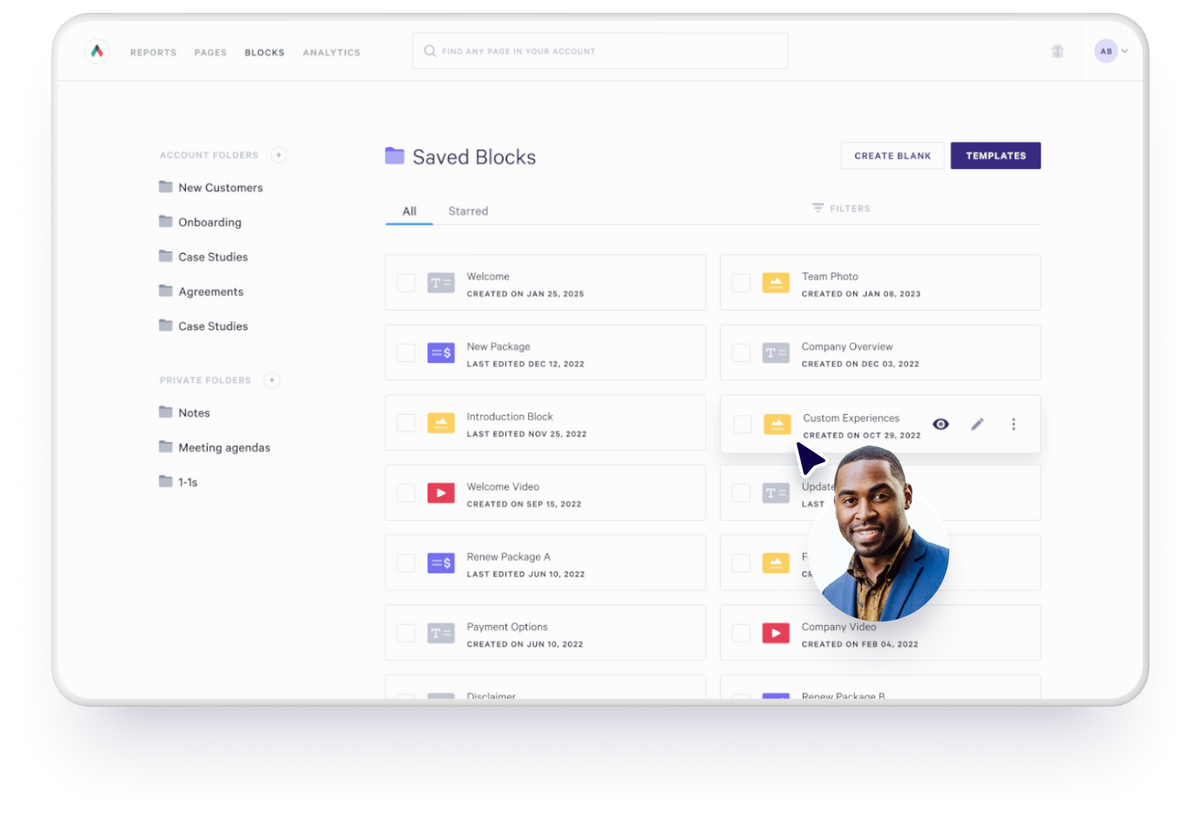
Take Destined, a Salesforce platinum partner agency, that built a content library of reusable Blocks—which now powers every proposal they send. Andrew Thomas, Head of Marketing at the company shared:
“We wanted velocity in our sales process, and Qwilr helped us achieve that. Proposals that used to take hours now take minutes, thanks to the content library we’ve created. Because of this, we are able to be more proactive with our opportunities by sending a proposal 25 minutes later that’s fully branded and personalized.”
To do this:
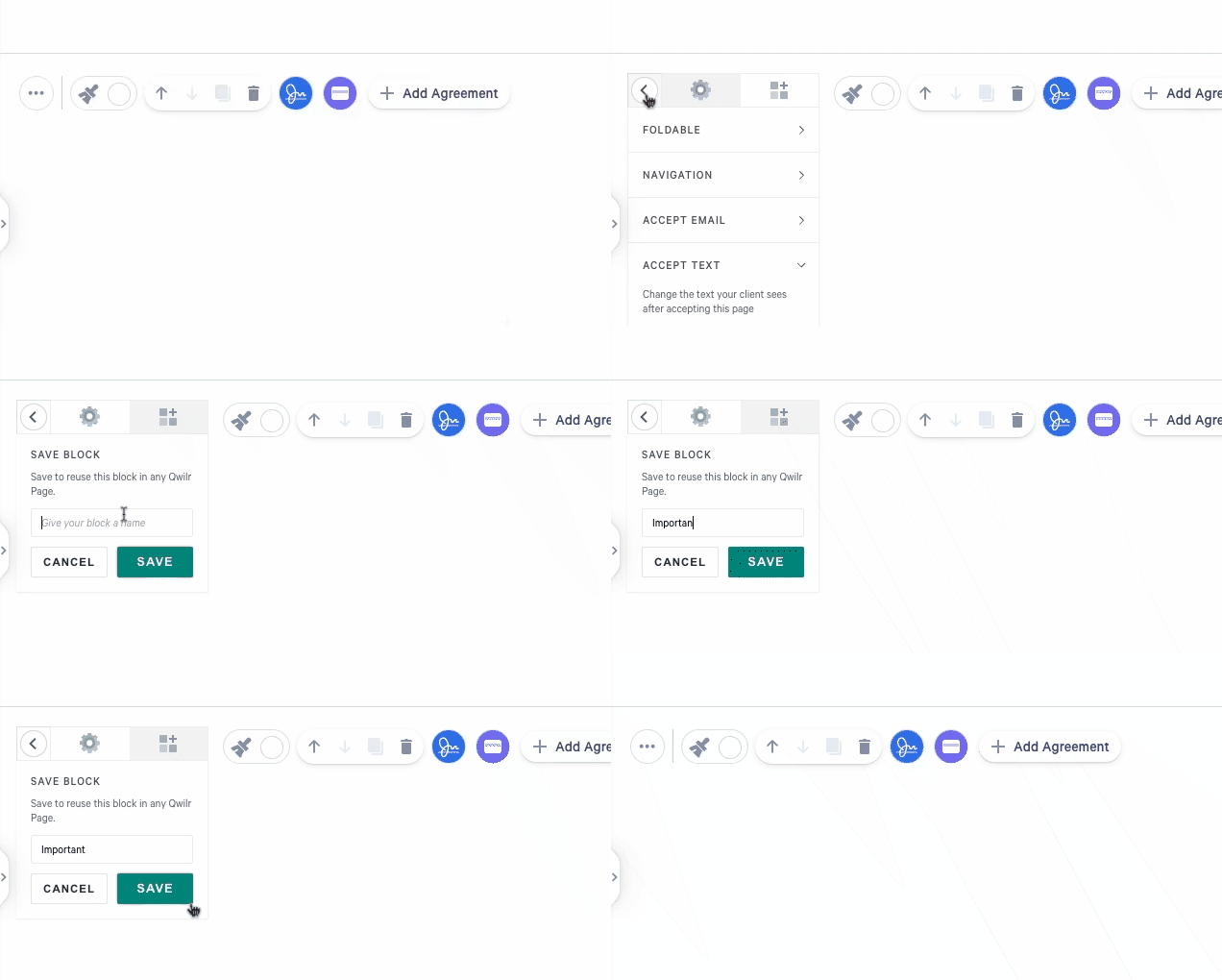
- Hover over the Block in any existing Qwilr Page
- Click the 3-dot menu, then hit Save Block
- Give it a clear title like “SaaS onboarding results” or “Real estate intro panel”
Everything you save lives in your Qwilr Block Library, which is searchable, filterable, and team-wide, so anyone building a proposal can find what they need fast.
A pro-tip here is to save blocks in context. For example, keep pricing blocks grouped with terms or upsells, or stack a case study with relevant metrics and testimonial quotes. This helps ensure they’re used as cohesive narrative units and not isolated fragments.
Step 3: Reuse instantly in any proposal, one-pager, or case study
Once your blocks are saved, they become your on-demand content library. Whenever you're building a new proposal, case study, or one-pager, you can quickly add these blocks without formatting from scratch or trawling through old docs.
Here's how it works:
- Click the “+” icon between any two blocks on your Qwilr page
- Select “Add Block from Library”
- Use the search bar or filters to find the right block (e.g., “Series B intro” or “Enterprise pricing”)
- Drag and drop it into place, and then tweak if needed

Because saved blocks retain their formatting, images, branding, and layout, you’re not just saving copy—you’re saving structure and style too. You can maintain consistency across pages without needing reps to become designers.
For example, a RevOps team preparing a proposal for a fast-moving Series B startup might reuse 3–4 blocks in minutes:
- A “Why us” block tailored for founder-led sales teams
- A pricing block showing side-by-side platform + onboarding costs
- A testimonial block featuring a quote from another Series B client
- A next steps block with a ready-to-go eSignature and timeline
That’s 80% of the proposal built in under 10 minutes, with approved messaging, on-brand visuals, and no last-minute design panic.
And it’s not just B2B SaaS seeing results. Symmetry Media, a video production company, uses Qwilr to streamline both creative and commercial storytelling—right down to the quote block:
“We trialled Qwilr, fell in love with it and now it’s a huge pillar of our business. We’ve built six templates for different tiers of production and tailor them as a new job comes up... It’s easy to include a Terms & Conditions hyperlink in our quote block, so that when a client is ready to come on board, they can simply click the ‘Accept’ button and digitally sign.”
James Carr, Executive Producer at Symmetry Media
Reusable blocks make it possible to scale with consistency, whether you're quoting a corporate video or closing a SaaS deal.
Step 4: Keep your library sharp (and your reps confident)
Your block library isn’t just a set-it-and-forget-it folder. The best teams treat it like a living system, curated, updated, and audited regularly so reps always know they’re using the latest, most accurate content.
That means:
- Reviewing blocks quarterly to remove outdated offers, refresh proof points, or align pricing
- Using clear, searchable names like “Series B | Onboarding Timeline” or “Real Estate | Pricing VIC”
- Assigning clear ownership (typically sales enablement or marketing) to keep the library clean and consistent
- Tagging blocks by persona, industry, or stage so they’re easy to filter and drop into any deal
This kind of structure empowers sales teams to move faster, without compromising on quality or branding.
Just ask Robert Brooks, Director of Sales at Lambda, who relies on a mix of well-crafted templates and pre-saved Blocks:
“I like that I had a starting point. It made putting things together go quicker.”
With branded templates and curated blocks, his team can build proposals confidently and independently, knowing the right content is just a few clicks away, minus the risk of sending outdated slides or pricing. It's a system built for speed and buyer experience.
Ready to build your own content stack?
Reusable content stacks aren’t just a productivity upgrade, but they’re how high-performing sales teams scale enablement, maintain brand and messaging consistency, and free up reps to focus on deal momentum instead of doc formatting.
If your team’s stuck rebuilding the same blocks or struggling to keep sales content aligned across stages, there’s a smarter way to work—one that protects your time and gets the right message to the right buyer, every time, through Qwilr.
Ready to see it in action? Book a demo with us, and we’ll show you how to build a content stack your whole sales team will actually use.