
Qwilr vs Proposify: which proposal software is right for you?
Proposify is built around a document editor, with structured templates, approval routing and a monthly send allowance on every plan. Qwilr is built around an interactive web page, with pricing buyers can explore, engagement data on every section, and no cap on how many proposals you send.
If the proposal is your pitch and you want to see how buyers read it, start with Qwilr. If your process is built around routing documents for internal approval, Proposify is built for that.
What buyers get from a Qwilr proposal
Elevate your buyer interactions
Hold buyer attention with interactive, online proposals. Embed video, calendar booking, pricing tables buyers can configure and ROI calculators, or start from one of 150+ templates.
Improve rep productivity with drag-and-drop sales collateral
Reps spend more time closing and less time reformatting. Build from reusable content blocks and saved sections rather than rebuilding a deck for every deal.
Share documents securely
Control how your content is shared with password access and recipient authentication, and set pages to expire automatically. Qwilr is SOC 2 Type 2 and GDPR aligned, with a certified audit trail on every acceptance.


















What’s the difference?
Every row below can be checked against either vendor's own documentation. Proposify details come from their published pricing and product pages.
What Proposify's send limits mean for your team
Proposify meters sends. Each plan carries a monthly allowance and going past it costs per document. At the time of writing that is 10 sends a month on Basic, 30 on Team and 75 on Business, with an overage charge on each one after that. Drafting and editing stay unlimited. The meter starts when you share the proposal with a client.
For a steady pipeline that is easy enough to budget for. For a team whose volume swings with the quarter, or one that sends a revised version to the same buyer more than once, it turns a fixed cost into a variable one that is awkward to forecast. Qwilr is priced per user, so the tenth proposal in a month costs the same as the first.
It also changes how you handle revisions. A Qwilr proposal is a live page, so a price change before acceptance is an edit rather than a resend. Worth checking against your own numbers: count the proposals your team sent last quarter, including second and third versions, and price both tools from there. Current Qwilr plans and what each one includes are on the pricing page.
Where the two differ in practice
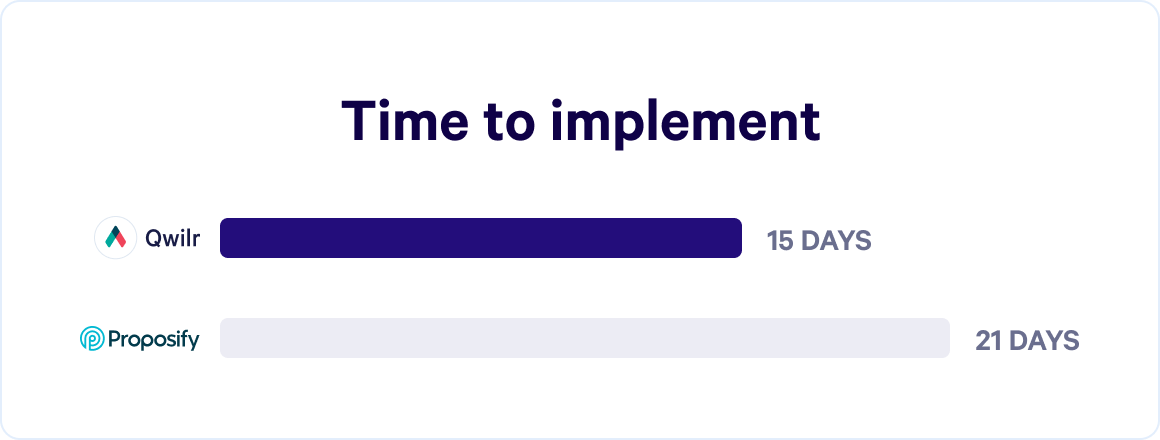
Fastest proposal solution to implement
Qwilr is built to be live quickly. Templates, a shared content library and onboarding support mean your first proposal goes out without a lengthy configuration project, and our design team will build the first template with you.
Level up your sales strategy with analytics
Qwilr's analytics show more than whether a proposal was opened. You see which sections held attention, which were skipped, who each viewer was including anyone it was forwarded to, and when someone came back. That is the detail a rep needs to decide who to call and what to say.
Backed by always-on, exceptional support
Qwilr offers 24-hour support on weekdays and cover across seven days, with an average response under an hour and a team spread across time zones. Higher plans add a dedicated customer success manager. If you would rather solve it yourself, the Help Centre is open to everyone.
Make buyer decision-making a breeze
Buyers browse pricing options, select add-ons, adjust quantities, sign and pay a deposit in one pass, without leaving the page or switching tools.
Moving your templates across
Moving across is a rebuild rather than a migration, and that is usually quicker than it sounds. Your best few templates get rebuilt in Qwilr, your brand styles are set once so every page inherits them, and your CRM connects to HubSpot, Pipedrive, Zoho, Salesforce or Microsoft Dynamics 365. Onboarding, design services and the Help Centre cover the rest.
Hear from customers who chose us



There's really nothing out there that can compete with Qwilr in terms of "wow" factor. Proposify is OK, but their proposals are not as impressive as Qwilr.



“Qwilr is incredibly easy to use and saves our team so much time. We know we’re putting our best foot forward with every prospect.”



Qwilr has been a game-changer for us. Sales collateral that used to be a pain to build in Slides/Docs can now be spun up with Qwilr in minutes. Plus, we get real-time reporting to know when a prospect has re-engaged or is sharing our materials internally.



“Qwilr has saved each sales rep an average of 1 hour per deal closed. Since implementing Qwilr, we have closed over 2,000 deals, saving us over 2,000 hours of time that we can invest in additional sales activities.”
What people are saying on G2
Verified reviews from Qwilr customers on G2.
Amazing. Closing a lot more deals with Qwilr compared to previous provider.
“I have yet to find any downsides. Qwilr does exactly what I need it to do.”
The best option on the market
Built-in templating, tokens, the pricing suite with tiered plans is excellent, overall look and feel adds an element of professionalism, integrations with many of the tools I use is a huge win.
Over the last two years, Qwilr has made huge and regular improvements to the editor, analytics, added agreements and several other things. I remain a big fan.
Love the templates with interchangeable pricing blocks
“I like how easy it is for me to create, track and submit proposals through the Hubspot Integration.”

Saves our agency time on routine proposals
Our clients really like the design and we've actually had clients become Qwilr customers themselves.
Branding can be customized quickly and easily which makes your proposals look even better.

Qwilr stood out due to its simplicity and clarity
We quickly discovered that Qwilr offered us many more benefits beyond our initial need. This got us thinking about other areas of the business that would benefit from embedding the solution into their processes.

Qwilr has helped improve our sales conversions and time to produce professional proposals
"We are able to fully track who views our proposals and this enables us to follow up with our prospects at the right time."

Qwilr vs Proposify: frequently asked questions
Qwilr is better for interactive, web-based proposals and buyer engagement data. Proposify is built around a document-style editor with structured templates and approval workflows. The underlying difference is format: a Qwilr proposal is a web page buyers open on any device, a Proposify proposal behaves like an online document. Growing sales teams and agencies that win on buyer experience tend to prefer Qwilr.
Yes. Qwilr is a popular Proposify alternative for teams that want a proposal to look and behave like a branded web page rather than a document. It adds interactive pricing, section-level analytics and built-in payments, while covering the essentials like e-signatures and CRM integration.
Partly, and it is worth being precise. Qwilr lets you lock blocks for admin-only editing and set folder and user permissions, so pricing tables, legal wording and brand elements stay fixed while reps edit the rest. What Qwilr does not have is multi-step approval routing, where a proposal queues for sign-off from legal or finance before it can be sent. Proposify does. If a deal desk gates every proposal in your business, weigh that carefully.
With Qwilr, yes to both. E-signatures and QwilrPay are built in, so a buyer can accept a quote and pay a deposit on the same page. Proposify includes e-signatures on every plan, but its published plans do not include payment collection, so you would connect a separate payment tool.
Proposify's published plans cap monthly document sends, with per-document overage charges once you pass the cap, and its entry plan excludes CRM integrations. Qwilr is priced per user rather than per send. If your team sends a high volume of proposals, or volume swings month to month, work out the overage cost before comparing headline prices.
Most teams send their first Qwilr proposal within days, since existing content gets rebuilt into templates rather than migrated file by file. There's no automatic Proposify import, so plan for a short rebuild of your top few templates rather than a straight data migration.